
Close the tab
A background PTY host keeps every shell running. Open the page again and pick up where you left off.
The same process
Web Session Terminal v0.4.2
westerm is a web terminal whose sessions survive closing the window, restarting the program, and rebooting. Tabs, split panes, and workspaces, in your browser or a desktop app for macOS, Windows, and Linux.
curl -fsSL https://westerm.app/install.sh | shirm https://westerm.app/install.ps1 | iexnpm install -g @pistacrab/westermnpx @pistacrab/westerm.
cargo install westerm --lockedThen run westerm and open http://127.0.0.1:4317.
Sessions that survive
This loop prints the time every second. Try to stop it.
A background PTY host keeps every shell running. Open the page again and pick up where you left off.
The same process
The dashboard and the shells run apart. Start westerm again and the page reconnects to the same shells.
The same process
westerm saves each screen and folder. After a reboot, every session comes back in its folder, marked “restored”. A Claude Code, Codex, or Gemini CLI conversation resumes too.
A new shell, the same screen and folder
AI agents
westerm sees Claude Code, Codex, and Gemini CLI in your shells. A ring around the AI mark shows what each one is doing. After a reboot, the restored shell runs the agent's resume command for you.
claude --resume <id>with the flags it hadcodex resume --lastthe folder's newest conversationgemini --resume <id>or the folder's latest, when the id is not knownmacOS and Linux. Settings ▸ Terminal ▸ Resume AI agents turns resuming off.
Agents sidebar
The Agents button at the top of the activity bar opens it. A yellow dot on the button means an agent needs your input.
One tab, everything
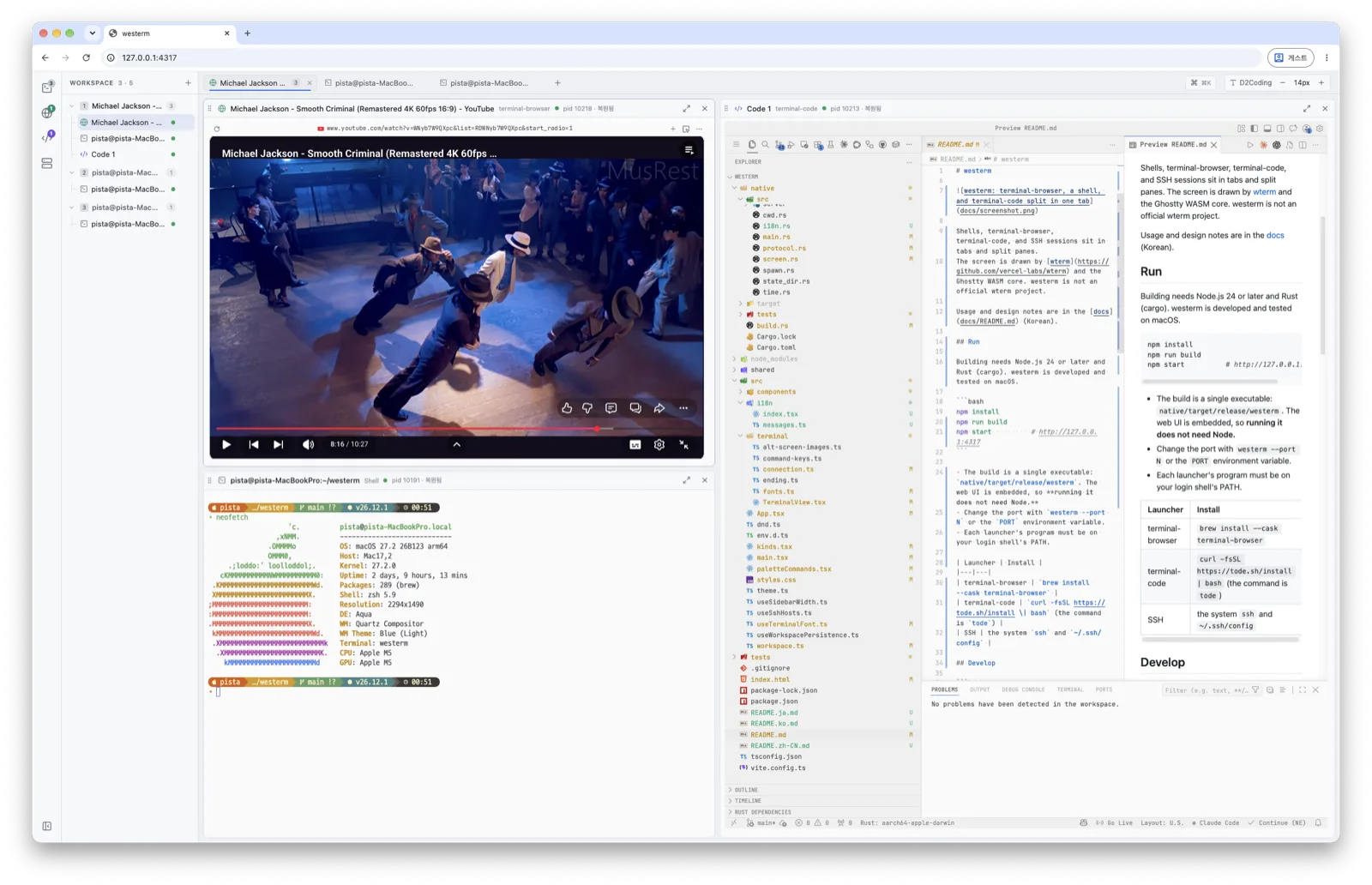
terminal-browser plays a video, a shell runs neofetch, and terminal-code edits the README, all split in one tab.
Features
Drag a pane onto an edge to split, or onto the center to swap. Layouts are saved per tab.
A set of tabs per project, each with a color and an icon. The workspaces out of view keep running.
Open a Linux server's westerm in its own window, over QUIC or an SSH tunnel. A lost network ends nothing.
Launch a web browser and a code editor that run in the terminal, next to your shells and SSH hosts. On Windows they run in WSL.
Read and edit a folder's Markdown files in View, Edit, or Split mode. The pane can follow your shell's cd.
⌘K or Ctrl+Shift+K launches, switches, renames, and moves anything. Type a URL to open it.
Ten color themes with light and dark sets. Pick terminal fonts from the ones installed on your computer. The UI speaks English, 한국어, 日本語, and 简体中文.
A single Rust executable with the UI inside, for macOS, Linux, and Windows. Get it with a script, npm, or Cargo. The desktop app puts the same dashboard in its own window.
How it works
The page you see is only a view. A background PTY host owns every shell, so the view can come and go.
The server listens on 127.0.0.1 only. Only the dashboard's own origin can open shells or change the layout.
westerm on 127.0.0.1:4317, UI insidewesterm host runs the shells, saves screens and folders, and watches AI agentsInstall
macOS · Linux
curl -fsSL https://westerm.app/install.sh | shWindows (PowerShell)
irm https://westerm.app/install.ps1 | iexThe script picks the build for your OS and CPU, checks its SHA-256, and installs it to ~/.local/bin (Windows: %LOCALAPPDATA%\Programs\westerm).
npm (Node.js 22 or later)
npm install -g @pistacrab/westermThe package has the release executables for every platform. No compiler or install script runs. Or run it once with npx @pistacrab/westerm.
Cargo
cargo install westerm --lockedWindows: Cargo does not include Microsoft's ConPTY, which terminal-browser images need. Use npm or the script there.
The same dashboard in its own window. If a westerm already runs on port 4317, the app opens that one. Quitting the app keeps your shells running.
| System | File |
|---|---|
| macOS | westerm-macos-app.dmg |
| Windows x64 | westerm-windows-app-setup.exe |
| Linux x64 | .deb · .rpm |
| Linux arm64 | .deb · .rpm |
macOS: the app is not notarized yet, so allow its first open once:
xattr -dr com.apple.quarantine /Applications/westerm.appWindows: SmartScreen may ask once. Choose More info ▸ Run anyway.
To install by hand, pick a file from Releases.
| System | File |
|---|---|
| macOS, Apple silicon | westerm-aarch64-apple-darwin.tar.gz |
| macOS, Intel | westerm-x86_64-apple-darwin.tar.gz |
| Linux x64 | westerm-x86_64-unknown-linux-musl.tar.gz |
| Linux arm64 | westerm-aarch64-unknown-linux-musl.tar.gz |
| Windows x64, arm64 | westerm-x86_64-pc-windows-msvc.zip |
westermwesterm stopwesterm updatewesterm --port 4318